
How do I report phishing, spam, or other malicious emails?
Phishing are emails, text messages or phone calls that attempt to trick the recipient into providing information or taking an action. Pause and assess before responding or taking action. The attackers are after your passwords, financial information, identity, or money. The reason behind falling for these scams are urgency, desire to please, greed, curiosity, complacency, fear. That is why some of their attempts are successful.
Protection systems are in place to prevent the majority of spam and phishing emails from entering our inboxes. However, it is not possible to prevent all unwanted emails from reaching University of Winnipeg email accounts. Therefore, it is important that everyone can identify and report these problem emails if they are received.
How to spot a phishing attack
Attackers may send emails, text messages, use phone calls, or post messages online in a phishing attack. They might include malware on a website or in an attachment, trying to take over your computer. They can also make fake websites that can ask you to log in, trying to steal your username and password. Hover over the link to see if it is the correct link. Only open attachments that you are expecting and check the file extension (avoid EXE, COM and VBS).
Identify malicious emails with tips such as these:
- If an email appears to come from someone at the University, but has a [This is external email] notice, it may be a phishing message. Be extra careful on mobile devices where it may not show the email address.
- Check the ‘From’ field – is the mail coming from a legitimate address?
- Does the subject title have any relevance to your job or the University?
- Look for spelling and grammatical errors in the content
- If a hyperlink is included, pass your mouse over it to see where the link goes
- Attachments (especially zipped ones) are extremely suspect
How to report a phishing email
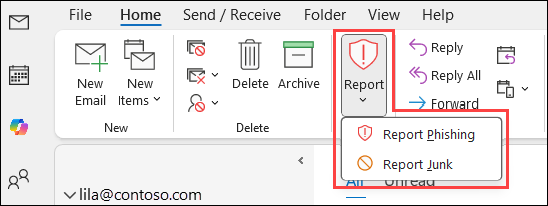
Click the 'Report' button in Outlook anytime you believe you have received a phishing email or any potentially dangerous email. Any messages you report using the Report button will be automatically deleted from your Inbox and moved to the Deleted Items folder. The emails you report will be forwarded to Microsoft’s cloud-based detection engine to improve filtering for others.
Note: This button should only be used to mark emails with malicious intent. Other nuisance emails, such as spam or marketing emails, should be flagged using the “Junk Email” feature.
How Identify the Threats – Spear Phishing, Whaling and Vishing
Spear Phishing – Spear phishing is like regular Phishing, but targets a specific group of people. For example, a spear phishing email can target employees of a specific company, customers of a specific company, or even a specific person. For example, many people on campus have received Phishing email from perceived “Technical Support Services”, telling them to follow a web link to change their email password.
Whaling – Whaling targets high-level executives or people in management positions (catch the big fish). A very recent example of this was an email sent to certain members of the University from what appeared to be a member of the Senior Administration, requesting certain information and actions from them. Other Whaling attacks in the past included one University Vice President and several directors. Whaling is a very real threat and is becoming more common. Attackers take time to research the organizational hierarchy and plan their attack accordingly.
Vishing – Vishing is a form of phishing that uses the phone system or voice over IP (VoIP) technologies. The user may receive an email, a phone message, or even a text encouraging them to call a phone number due to some discrepancy. If they call, an automated recording prompts them to provide detailed information to verify their account such as credit card number, expiration date, birth date, and so on.